Search This Blog

Sunday, 26 January 2014

Bottoo! Platform to test ranging sensors and algorithms


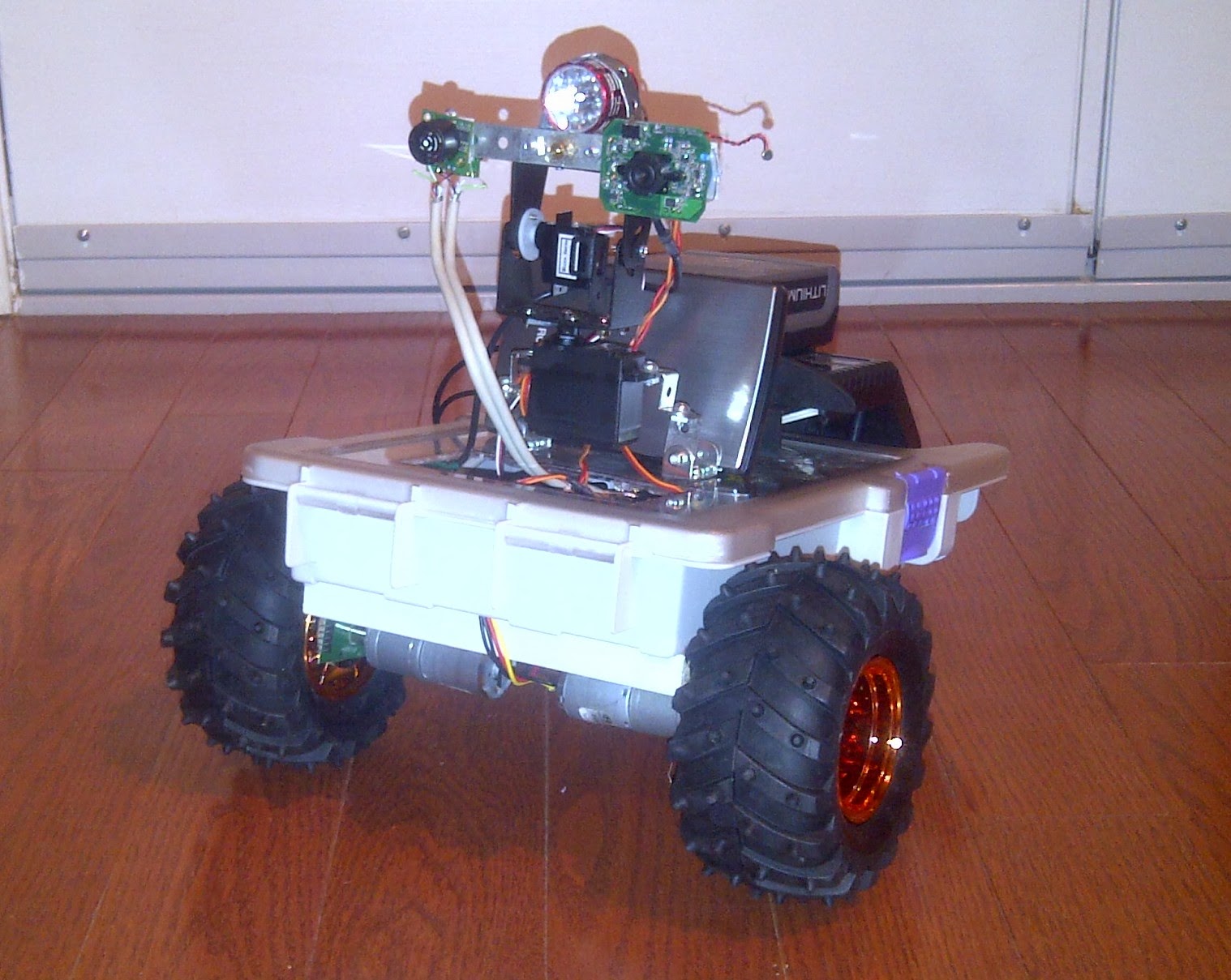
This is my second bot.  I just started it a couple days ago, and expect it will be a few more before I submit a video.  This one has low speed (50rpm)  high torque motors.
My first one ran too fast for the wheel edge encoders, and if you drove him slow, he would stall under the weight.
Botoo (bot-2)  will be equipped with:
  • Raspberry Pi Model B (512mb) with wifi
  • 1 Arduino UNO and 2 Arduino Pro Minis
  • The I2C Sonar Pod that I'm working on.
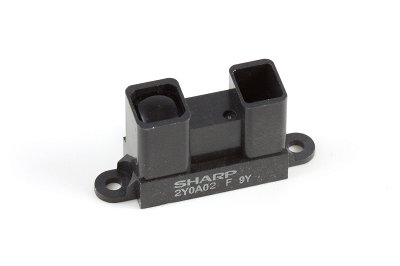
  • A set of standard Sharp  2Y0A02 IR sensors on front/rear/left/right  ( I may also put two more on 45 degree front-right/front-left).
  • A pulsed line lazer with Webcam for Paralax ranging, and ....
  • I just bought a Kinect 
The purpose of this bot is to develop and refine routines for identifying landmarks (walls, doors, furniture) to allow for better interpretation of ranging data.

Update: 14/01/04

Got power supplies, Raspberry PI, and Arduino UNO up and running, and running simple sketches to tune wheel encoders.

Update: 14/01/07
So, this is the oldschool laserprinted encoder wheel and QRD1114 that I'm using on Robbie... I will admit to wasting more time on this little POS circuit than any other piece of this build.


So, I treated myself to a commercial set of encoders from Solarbotics.  As well as the typical quadrature encode funtions, they have a CLK pin pwm modulated and a direction pin. (Also have a serial out with distance/velocity, but...)


I had to enlarge the hole by a few thou to get it over the hub of my new wheels.  Not what Solarbotics intended, im sure...
Fine print warned me against using it on anything other than their GM 2/3/8/9 gear motors...  My skull's too thick for that to register though...


And yes!!!  that is hot glue holding it all together.  Once I get the alignment validated.... then we'll put in the screws!


Update: 14/01/10
Telemetry control board - 1/2 completed...


Update: 14/01/16
Apologies for the slow progress on this.  Three kids under 7 means little time to myself or my projects.  :)
I'm all wired up now, and working on my code.  If I were to admit to having any skills whatsoever in coding, I'd have to say PHP is my comfort zone.  However I2C capabilities on the Raspberry Pi are pretty much non existent in PHP.
I found this https://github.com/tbrianjones/raspberry-pi-i2c-bus/blob/master/peripherals/i2c_bus.php  as a good start.
I'm expanding upon this, using the Adafruit python I2C bus code as a template.
I need to read/manage:
I would love to hear from anyone who has had any experience in PHP on the Pi....


Update 2: 14/01/16
It's been a rather productive, yet expensive day.  I somehow shorted out and destroyed my 18v Lithium ION motor battery. Awesome!
So, I'm improvising with 8 AA NiMH rated @2100 mah... we'll see how that does for now.
Here's is a picture of it's first "un-tethered" voyage....


... and yes.... it hit the stack of DVDs.  apparently I was scanning right over top of them.
Video to come soon.  (Is this the part where I admit to my lack of skill at making/editing videos?)

Update: 14/01/26
I've replaced the dead 18v Lithium Ion battery with a standard 12v gel cell.  Easier to charge, weighs a bit more, but... whatever...
I get bored easily, and have too many little things that I jump around between.  Lately I've been working on various routines for "self preservation".  Nothing extraordinary, just typical things like if the battery gets below a certain point, come back to base to charge .  The latest one was regarding wifi connectivity on the Raspberry Pi.   The routine would evaluate the wifi connection with the WebServer (commands coming in/telemetry going out) and if it hasn't connected in a while,  or the wifi signal is too low (small usb dongle inside chassis... bad idea...)  the rover would seek out a stronger signal.   Sounds great in theory.

So I went downstairs this morning, to find the rover huddled in my living room directly below the wifi router.... battery dead as a doornail.  Upon reading the logs, it appears that I accidently connected the routine that would send him back to the charging station on low battery with the new one that would attempt to correct wifi issues.    Battery got low, so he looked for a stronger signal!   Makes sense to me...

btw.... I said something like "Awwwww... it looks like he was trying to get a better signal..." in hearing distance of the wife...  She just looked at me, and said   "He?..."


Wednesday, 11 December 2013

My "live" Sonar scan in HTML5/Javascript


I had a desire to have a live sonar feed displayed in the control panel.  Visual feedback, if you will.   At first, I used google charts, and updated it frequently, but it wasn't quite what I was looking for.

The radar chart is not specifically tied to polar coordinates, and it was difficult to accurately represent my sonar scan dataset without fiddling with it too much before sending off to google for charting.  And god forbid I should change the scan interval.....

So... I started looking for a reasonable canvas based Sonar/Radar screen... and I looked... and I looked...  not much out there... Lots of stuff done in "processing" or various toolsets... but no raw HTML5/Javascript canvas.

But I *did* come across this awesome looking HTML5 Clock that was just what I needed as a base to build upon at http://saturnboy.com/2013/10/html5-sonarcnv-clock 


The sonar.php  file which displays the instrument expects it's data as a JSON encoded data set in the form of:
{"ardtime":"43942","pan":"25","radius":"117","heading":"38.6"}
  • Ardtime is the millis counter sent from the Arduino at the time of start of scan.  a UID if you like, to associate a set of data.
  • Pan is the angle at which the sonar pod is taking its reading with respect to the front of the rover.
  • Radius is the distance to target in Centimeters.
  • Heading is the compass direction the rover is pointing.

Currently it clears the face at the end of each sweep.  When I get more time, I will be correcting that as well as integrating multiple overlapping scans to filter out noise.   Yes... I am already normalizing each scan by averaging five pings per position, but still finding spurious reflections that are messing with the mapping.


Here is the "get_sonar.php" script that retrieves the most recent sonar dataset from MySQL and JSON encodes it for the Javascript that draws the sonar screen.


<?php
if (isset($argv)) {            // If running from the command line
    $pan = $argv[1];

}
else {
    $pan = $_GET['pan'];
}
 
 include 'database_creds.inc';

$limit = 360;            // How many results to show in chart
$send_string = '{"success": true,"scan": [';

try {
    $dbh = new PDO("mysql:host=$hostname;dbname=mapdb", $username, $password);
    /*** echo a message saying we have connected ***/
   // echo 'Connected to database<br>';

    $sth = $dbh->query('SELECT MAX(uid) FROM scanning');   // Get UID of most recent scan
    $maxuid = $sth->fetchColumn();
   

     $sql = 'SELECT ardtime FROM scanning WHERE uid = :maxuid';
        $sth = $dbh->prepare($sql);
    $sth->bindValue(':maxuid', $maxuid, PDO::PARAM_INT);
    $sth->execute();
        $row = $sth->fetch(PDO::FETCH_ASSOC);
        $ardtime = $row["ardtime"];

     $sql = 'SELECT ardtime, pan, radius, heading FROM scanning WHERE ardtime = :ardtime ORDER BY pan';
 
    $sth = $dbh->prepare($sql);
    $sth->bindValue(':ardtime', $ardtime, PDO::PARAM_STR);
    //$sth->bindValue(':pan', $pan, PDO::PARAM_STR);
    $sth->execute();

    while ($row = $sth->fetch(PDO::FETCH_ASSOC)) {

                $send_string .= json_encode($row) .',';
    }


     $send_string = rtrim($send_string, ',');
    $send_string .=   '] }';


    echo $send_string;

    $dbh = null;
    $sth = null;


}
catch(PDOException $e)
    {
    echo $e->getMessage();
    }

?>

And here is the "sonar.php" script that displays the most recent sonar dataset as a sweeping sonar screen.


<!DOCTYPE HTML>
<html>
<head>
<title>Sonar</title>
<style>

#sonarcnv {
  position:absolute;
  top:50%;
  left:50%;
  width:400px;
  height:400px;
  margin:-200px 0 0 -200px;
}
</style>
    <script src="//ajax.googleapis.com/ajax/libs/jquery/1.8.2/jquery.min.js" type="text/javascript"></script>

</head>

<body onload="sonar();">

<canvas id="sonarcnv"></canvas>

<script>
// Much of this borrowed from  http://saturnboy.com/2013/10/html5-sonarcnv-clock/ 
//
//        
// *******  Global variables    *******
var JSONping = "";          // JSON array of the most recent sonar scan
var secAngle = 0;           // angle of the sweep hand
var ardtime = 0;            // Arduino time (UID) associated with most recent scan

function sonar() {
  var sonarcnv = document.getElementById('sonarcnv');

  //guarantee sonarcnv is supported
  if (!sonarcnv.getContext) {
    alert('sonarcnv not supported!');
    return;
  }
 
  sonarcnv.width = 400;
  sonarcnv.height = 400;
  var sonarctx = sonarcnv.getContext('2d');
  sonarctx.clearRect(0, 0, 400, 400);

  drawFace(sonarctx);

  tick();
}

function tick() {           //  Sweep the hand around the dial

    secAngle += 40 * Math.PI / 60;         
        // 40 is an arbitrary number I chose for the speed of the sweep
   
           var sonarcnv = document.getElementById('sonarcnv');
      var sonarctx = sonarcnv.getContext('2d');
 
      sonarctx.translate(200, 200);
    drawTicks(sonarctx, secAngle);
    drawSweepHand(sonarctx, secAngle);
    sonarctx.translate(-200, -200);
    drawFace2(sonarctx);

    drawPings(sonarctx, secAngle);              // Draw most recent sonar sweep targets
 
      setTimeout(tick, 15);
}

function drawFace(sonarctx) {
    //outer black ring
      sonarctx.beginPath();
      sonarctx.arc(200, 200, 200, 0, 2 * Math.PI);
      sonarctx.fillStyle = '#111';
      sonarctx.fill();
      sonarctx.closePath();
     
      //next light grey ring
      sonarctx.beginPath();
      sonarctx.arc(200, 200, 198, 0, 2 * Math.PI);
      sonarctx.fillStyle = '#bbb';
      sonarctx.fill();
      sonarctx.closePath();


      //outer gradient bezel
      var g1x1 = 200 + 196 * Math.cos(4/3*Math.PI);
      var g1y1 = 200 + 196 * Math.sin(4/3*Math.PI)
      var g1x2 = 200 + 196 * Math.cos(1/3*Math.PI);
      var g1y2 = 200 + 196 * Math.sin(1/3*Math.PI);     
      var g1 = sonarctx.createLinearGradient(g1x1,g1y1,g1x2,g1y2);
      g1.addColorStop(0, '#f4f4f4');  
      g1.addColorStop(1, '#000');
     
      sonarctx.beginPath();
      sonarctx.arc(200, 200, 196, 0, 2 * Math.PI);
      sonarctx.fillStyle = g1;
      sonarctx.fill();
      sonarctx.closePath();

      //next outer bezel
      var g2x1 = 200 + 174 * Math.cos(4/3*Math.PI);
      var g2y1 = 200 + 174 * Math.sin(4/3*Math.PI)
      var g2x2 = 200 + 174 * Math.cos(1/3*Math.PI);
      var g2y2 = 200 + 174 * Math.sin(1/3*Math.PI);     
      var g2 = sonarctx.createLinearGradient(g2x1,g2y1,g2x2,g2y2);
      g2.addColorStop(0, '#000');  
      g2.addColorStop(1, '#777');  
     
      sonarctx.beginPath();
      sonarctx.arc(200, 200, 174, 0, 2 * Math.PI);
      sonarctx.fillStyle = g2;
      sonarctx.fill();
      sonarctx.closePath();

      //tan clock face
      sonarctx.beginPath();
      sonarctx.arc(200, 200, 162, 0, 2 * Math.PI);
      //sonarctx.fillStyle = '#d5c595';
          sonarctx.fillStyle = '#666666';
      sonarctx.fill();
      sonarctx.closePath();

      sonarctx.beginPath();
      sonarctx.arc(200, 200, 38, 0, 2 * Math.PI);
      sonarctx.lineWidth = 2;
          sonarctx.strokeStyle = '#666666';
          sonarctx.stroke();
      sonarctx.closePath();

}

function drawTicks(sonarctx, ang) {
      
  //radial lines
    drawPath(sonarctx, 'M -98,-1 L 98,-1 98,1 -98,1 Z', '#baa77c', 0);
    drawPath(sonarctx, 'M -98,-1 L 98,-1 98,1 -98,1 Z', '#baa77c', 30);
    drawPath(sonarctx, 'M -98,-1 L 98,-1 98,1 -98,1 Z', '#baa77c', 60);
    drawPath(sonarctx, 'M -98,-1 L 98,-1 98,1 -98,1 Z', '#baa77c', 90);
    drawPath(sonarctx, 'M -98,-1 L 98,-1 98,1 -98,1 Z', '#baa77c', 120);
    drawPath(sonarctx, 'M -98,-1 L 98,-1 98,1 -98,1 Z', '#baa77c', 150);

    //triangle ticks
      drawPath(sonarctx, 'M 154,0 L 178,-6 178,6 Z', '#111', 0);
      drawPath(sonarctx, 'M 154,0 L 178,-6 178,6 Z', '#111', 90);
      drawPath(sonarctx, 'M 154,0 L 178,-6 178,6 Z', '#111', 180);
      drawPath(sonarctx, 'M 154,0 L 178,-6 178,6 Z', '#111', -90);
   
        //long brown ticks 
    drawPath(sonarctx, 'M 156,-2 L 180,-2 180,2 156,2 Z', '#baa77c', 30);
    drawPath(sonarctx, 'M 156,-2 L 180,-2 180,2 156,2 Z', '#baa77c', 60);
    drawPath(sonarctx, 'M 156,-2 L 180,-2 180,2 156,2 Z', '#baa77c', 120);
    drawPath(sonarctx, 'M 156,-2 L 180,-2 180,2 156,2 Z', '#baa77c', 150);
    drawPath(sonarctx, 'M 156,-2 L 180,-2 180,2 156,2 Z', '#baa77c', -30);
    drawPath(sonarctx, 'M 156,-2 L 180,-2 180,2 156,2 Z', '#baa77c', -60);
    drawPath(sonarctx, 'M 156,-2 L 180,-2 180,2 156,2 Z', '#baa77c', -120);
    drawPath(sonarctx, 'M 156,-2 L 180,-2 180,2 156,2 Z', '#baa77c', -150);
   
    //text labels: 3,6,9,12
    sonarctx.font = '16pt Georgia';
    sonarctx.textAlign = 'center';
    sonarctx.textBaseline = 'middle';
    sonarctx.fillStyle = '#444';

    sonarctx.fillText('30', 0, -48);
    sonarctx.fillText('75', 0, -82);
    sonarctx.fillText('150', 0, -125);
    sonarctx.fillText('225', 0, -155);

    //big dot above 12
    sonarctx.beginPath();
     sonarctx.arc(0, -185, 4, 0, 2 * Math.PI);
      sonarctx.fillStyle = '#444';
     sonarctx.fill();
     sonarctx.closePath();

       
        for (var i = 0; i < 360; i += 30) {
        //outer tick squares
        drawPath(sonarctx, 'M 170,-3 L 174,-3 174,3 170,3 Z', 'rgba(68,68,68,0.8)', i);
       
        //inner tick squares
        drawPath(sonarctx, 'M 104,-3 L 110,-3 110,3 104,3 Z', 'rgba(68,68,68,0.8)', i);

        //outer text labels
        var lbl = '' + Math.round(i +90);
        if (lbl == '360') lbl = '';
        if (lbl == '390') lbl = '30';
        if (lbl == '420') lbl = '60';
        var x = 185 * Math.cos(i * Math.PI / 180.0);
        var y = 185 * Math.sin(i * Math.PI / 180.0);
        sonarctx.save();
        sonarctx.translate(x,y);
        sonarctx.rotate((i + 90 - (i > 0 && i < 180 ? 180 : 0)) * Math.PI / 180.0);
        sonarctx.font = '9pt Georgia';
        sonarctx.textAlign = 'center';
        sonarctx.textBaseline = 'middle';
        sonarctx.fillStyle = 'rgba(68,68,68,0.8)';
        sonarctx.fillText(lbl, 0, 0);
        sonarctx.restore();
       
        //far outer dots between labels
        sonarctx.beginPath();
        x = 180 * Math.cos((i+15) * Math.PI / 180);
        y = 180 * Math.sin((i+15) * Math.PI / 180);
        sonarctx.arc(x, y, 1.5, 0, 2 * Math.PI);
        sonarctx.fillStyle = '#444';
        sonarctx.fill();
        sonarctx.closePath();
                 
        for (var j = 0; j < 25; j += 6) {
            if (j != 0) {
              //outer tick ring - long ticks
                drawPath(sonarctx, 'M 154,-0.5 L 164,-0.5 164,0.5 154,0.5 Z', '#444', i+j);
               
                //inner tick ring - short ticks
                drawPath(sonarctx, 'M 104,-0.5 L 110,-0.5 110,0.5 104,0.5 Z', 'rgba(68,68,68,0.8)', i+j);
            }
           
            for (var k = 1.5; k < 5; k += 1.5) {
                //outer tick ring - short ticks
                drawPath(sonarctx, 'M 160,-0.3 L 164,-0.3 164,0.3 160,0.3 Z', 'rgba(68,68,68,0.5)', i+j+k);
            }
        }
    }
}

function drawSweepHand(sonarctx,ang) {
  drawPath(sonarctx, 'M -50,0 L -45,-5 -25,-5 -22,-2 22,-2 25,-5 160,0 25,5 22,2 -22,2 -25,5 -45,5 Z', '#006666', ang-90);
  // the -90 puts North at the top.
  sonarctx.beginPath();
  sonarctx.arc(0, 0, 8, 0, 2 * Math.PI);
  sonarctx.fillStyle = '#008800';
  sonarctx.fill();
  sonarctx.closePath();
}


function drawFace2(sonarctx) {
  //outer center button ring
  var g1x1 = 200 + 5 * Math.cos(4/3*Math.PI);
  var g1y1 = 200 + 5 * Math.sin(4/3*Math.PI)
  var g1x2 = 200 + 5 * Math.cos(1/3*Math.PI);
  var g1y2 = 200 + 5 * Math.sin(1/3*Math.PI);     
  var g1 = sonarctx.createLinearGradient(g1x1,g1y1,g1x2,g1y2);
  g1.addColorStop(0, '#999');  
  g1.addColorStop(1, '#333');
 
  sonarctx.beginPath();
  sonarctx.arc(200, 200, 5, 0, 2 * Math.PI);
  sonarctx.fillStyle = g1;
  sonarctx.fill();
  sonarctx.closePath();
 
  //inner center button
  var g2x1 = 200 + 3 * Math.cos(4/3*Math.PI);
  var g2y1 = 200 + 3 * Math.sin(4/3*Math.PI)
  var g2x2 = 200 + 3 * Math.cos(1/3*Math.PI);
  var g2y2 = 200 + 3 * Math.sin(1/3*Math.PI);     
  var g2 = sonarctx.createLinearGradient(g2x1,g2y1,g2x2,g2y2);
  g2.addColorStop(0, '#ccc');  
  g2.addColorStop(1, '#aaa');
 
  sonarctx.beginPath();
  sonarctx.arc(200, 200, 3, 0, 2 * Math.PI);
  sonarctx.fillStyle = g2;
  sonarctx.fill();
  sonarctx.closePath();
 
  //highlight (gradient overlay)
  var g3x1 = 200 + 162 * Math.cos(4/3*Math.PI);
  var g3y1 = 200 + 162 * Math.sin(4/3*Math.PI)
  var g3x2 = 200 + 162 * Math.cos(1/3*Math.PI);
  var g3y2 = 200 + 162 * Math.sin(1/3*Math.PI);     
  var g3 = sonarctx.createLinearGradient(g3x1,g3y1,g3x2,g3y2);
  g3.addColorStop(0, 'rgba(0,0,0,0.5)');  
  g3.addColorStop(1, 'rgba(0,0,0,0)');
 
  sonarctx.beginPath();
  sonarctx.arc(200, 200, 162, 0, 2 * Math.PI);
  sonarctx.fillStyle = g3;
  //sonarctx.fillStyle = 'black';
  sonarctx.fill();
  sonarctx.closePath();
 
    sonarctx.beginPath();
    sonarctx.arc(200, 200, 68, 0, 2 * Math.PI);
    sonarctx.lineWidth = 2;
    sonarctx.strokeStyle = '#666666';
    sonarctx.stroke();
    sonarctx.closePath();
   
      sonarctx.beginPath();
      sonarctx.arc(200, 200, 38, 0, 2 * Math.PI);
      sonarctx.lineWidth = 2;
      sonarctx.strokeStyle = '#666666';
      sonarctx.stroke();
      sonarctx.closePath();


}

/** Simple svg path parser that only understands M (move to) and L (line to). */
function drawPath(sonarctx,path,fill,ang) {
  sonarctx.save();
    sonarctx.rotate(ang == undefined ? 0 : ang  * Math.PI / 180.0);
    sonarctx.beginPath();
   
    var parts = path.split(' ');
    while (parts.length > 0) {
      var part = parts.shift();
      if (part == 'M') {
        coords = parts.shift().split(',');
        sonarctx.moveTo(coords[0], coords[1]);
      } else if (part == 'L') {
        continue;
      } else if (part == 'Z') {
        break;
      } else if (part.indexOf(',') >= 0) {
            coords = part.split(',');
            sonarctx.lineTo(coords[0], coords[1]);
        }
    }
   
    sonarctx.closePath();
    sonarctx.fillStyle = (fill == undefined ? '#000' : fill);
    sonarctx.fill();
    sonarctx.restore();
}

function drawPings(sonarctx, ang) {             // Draw sonar targets on dial
var x=null;
var y=null;
var oldx =200, oldy=200;
var rang = findReferenceAngle(ang-90);
var pan = null;
var radius = null;
var heading = null;
var surl = null;
var dt = new Date();
var grabbed = 0;

    if(rang > 0 && rang < 5 && grabbed === 0) {
        grabbed = 1;
         $.get('get_sonar.php', function(row){       // Get the most recent sonar sweep to display
                  JSONping = JSON.parse(row);
        });
    }
    if(dt.getSeconds() > 0) grabbed = 0;

        for (var i in JSONping.scan) {

            var scan = JSONping.scan[i];
            pan = JSONping.scan[i].pan;             // Pan position of sonar scan
            radius = JSONping.scan[i].radius;       // Polar radius
            heading = JSONping.scan[i].heading;
            ardtime = JSONping.scan[i].heading;

        // Red dot for current heading
              sonarctx.beginPath();
              hx = (156 * Math.cos(toRadians(heading-90))) +200;
              hy = (156 * Math.sin(toRadians(heading-90))) + 200;

              sonarctx.arc(hx, hy, 5, 0, 2 * Math.PI);
              sonarctx.fillStyle = "red";
              sonarctx.fill();
              sonarctx.closePath();


            if(radius > 150) radius = 150;  // limit scale to boundary of dial
            // Convert polar to cartesian

            if((pan) <= findReferenceAngle(ang))
            {   
         x = (radius * Math.cos(toRadians(pan-90))) +200;
         y = (radius * Math.sin(toRadians(pan-90))) + 200;

              // Draw the ping target at the cartesian coordinate
              sonarctx.beginPath();
              sonarctx.arc(x, y, 3, 0, 2 * Math.PI);
              sonarctx.fillStyle = "green";
              sonarctx.fill();
              sonarctx.closePath();
              sonarctx.strokeStyle = 'green';
              sonarctx.moveTo(oldx, oldy);
              sonarctx.lineTo(x,y);
              oldx = x; oldy = y;
              sonarctx.stroke();
           }
        }
}


function toDegrees (angle) {
  return angle * (180 / Math.PI);
}

function toRadians (angle) {
  return angle * (Math.PI / 180);
}

function findReferenceAngle(ang) {
var quad = "";
var ref = "No";
    while (ref === "No"){ 
        if (ang >= 0 && ang < 360){     
            ref = ang; 
        } else if (ang < 0){     
            ang = ang + 360; 
        } else {     
            ang = ang - 360; 
        }
    }
    return ang;
}

function print_r(theObj){
  if(theObj.constructor == Array ||
     theObj.constructor == Object){
    document.write("<ul>")
    for(var p in theObj){
      if(theObj[p].constructor == Array||
         theObj[p].constructor == Object){
document.write("<li>["+p+"] => "+typeof(theObj)+"</li>");
        document.write("<ul>")
        print_r(theObj[p]);
        document.write("</ul>")
      } else {
document.write("<li>["+p+"] => "+theObj[p]+"</li>");
      }
    }
    document.write("</ul>")
  }
}
</script>
</body>
</html>


and just for completion, here is what a live dataset, JSON encoded from MYSQL would look like:


{"success": true,"scan": [
{"ardtime":"134","pan":"5","radius":"63","heading":"19.5"},{"ardtime":"134","pan":"10","radius":"74","heading":"19.5"},{"ardtime":"134","pan":"15","radius":"73","heading":"19.5"},{"ardtime":"134","pan":"20","radius":"76","heading":"19.5"},{"ardtime":"134","pan":"25","radius":"69","heading":"19.5"},{"ardtime":"134","pan":"30","radius":"61","heading":"19.5"},{"ardtime":"134","pan":"35","radius":"67","heading":"19.5"},{"ardtime":"134","pan":"40","radius":"61","heading":"19.5"},{"ardtime":"134","pan":"45","radius":"53","heading":"19.5"},{"ardtime":"134","pan":"50","radius":"54","heading":"19.5"},{"ardtime":"134","pan":"55","radius":"43","heading":"19.5"},{"ardtime":"134","pan":"60","radius":"53","heading":"19.5"},{"ardtime":"134","pan":"65","radius":"54","heading":"19.5"},{"ardtime":"134","pan":"70","radius":"56","heading":"19.5"},{"ardtime":"134","pan":"75","radius":"56","heading":"19.5"},{"ardtime":"134","pan":"80","radius":"41","heading":"19.5"},{"ardtime":"134","pan":"85","radius":"58","heading":"19.5"},{"ardtime":"134","pan":"95","radius":"61","heading":"19.6"},{"ardtime":"134","pan":"100","radius":"40","heading":"19.6"},{"ardtime":"134","pan":"105","radius":"50","heading":"19.6"},{"ardtime":"134","pan":"110","radius":"58","heading":"19.6"},{"ardtime":"134","pan":"115","radius":"48","heading":"19.6"},{"ardtime":"134","pan":"120","radius":"59","heading":"19.6"},{"ardtime":"134","pan":"125","radius":"87","heading":"19.6"},{"ardtime":"134","pan":"130","radius":"66","heading":"19.6"},{"ardtime":"134","pan":"135","radius":"75","heading":"19.6"},{"ardtime":"134","pan":"140","radius":"85","heading":"19.6"},{"ardtime":"134","pan":"145","radius":"97","heading":"19.6"},{"ardtime":"134","pan":"150","radius":"104","heading":"19.6"},{"ardtime":"134","pan":"155","radius":"68","heading":"19.6"},{"ardtime":"134","pan":"160","radius":"98","heading":"19.6"},{"ardtime":"134","pan":"165","radius":"102","heading":"19.6"},{"ardtime":"134","pan":"170","radius":"80","heading":"19.6"},{"ardtime":"134","pan":"175","radius":"86","heading":"19.6"},{"ardtime":"134","pan":"180","radius":"102","heading":"19.5"},{"ardtime":"134","pan":"185","radius":"81","heading":"19.5"},{"ardtime":"134","pan":"190","radius":"101","heading":"19.5"},{"ardtime":"134","pan":"195","radius":"98","heading":"19.5"},{"ardtime":"134","pan":"200","radius":"106","heading":"19.5"},{"ardtime":"134","pan":"205","radius":"69","heading":"19.5"},{"ardtime":"134","pan":"210","radius":"112","heading":"19.5"},{"ardtime":"134","pan":"215","radius":"68","heading":"19.5"},{"ardtime":"134","pan":"220","radius":"49","heading":"19.5"},{"ardtime":"134","pan":"225","radius":"71","heading":"19.5"},{"ardtime":"134","pan":"230","radius":"36","heading":"19.5"},{"ardtime":"134","pan":"235","radius":"30","heading":"19.5"},{"ardtime":"134","pan":"240","radius":"41","heading":"19.5"},{"ardtime":"134","pan":"245","radius":"40","heading":"19.5"},{"ardtime":"134","pan":"250","radius":"35","heading":"19.5"},{"ardtime":"134","pan":"255","radius":"46","heading":"19.5"},{"ardtime":"134","pan":"260","radius":"42","heading":"19.5"},{"ardtime":"134","pan":"265","radius":"53","heading":"19.5"},{"ardtime":"134","pan":"275","radius":"80","heading":"19.6"},{"ardtime":"134","pan":"280","radius":"59","heading":"19.6"},{"ardtime":"134","pan":"285","radius":"70","heading":"19.6"},{"ardtime":"134","pan":"290","radius":"74","heading":"19.6"},{"ardtime":"134","pan":"295","radius":"61","heading":"19.6"},{"ardtime":"134","pan":"300","radius":"74","heading":"19.6"},{"ardtime":"134","pan":"305","radius":"76","heading":"19.6"},{"ardtime":"134","pan":"310","radius":"70","heading":"19.6"},{"ardtime":"134","pan":"315","radius":"89","heading":"19.6"},{"ardtime":"134","pan":"320","radius":"93","heading":"19.6"},{"ardtime":"134","pan":"325","radius":"52","heading":"19.6"},{"ardtime":"134","pan":"330","radius":"77","heading":"19.6"},{"ardtime":"134","pan":"335","radius":"105","heading":"19.6"},{"ardtime":"134","pan":"340","radius":"65","heading":"19.6"},{"ardtime":"134","pan":"345","radius":"91","heading":"19.6"},{"ardtime":"134","pan":"350","radius":"88","heading":"19.6"},{"ardtime":"134","pan":"355","radius":"77","heading":"19.6"},{"ardtime":"134","pan":"360","radius":"74","heading":"19.5"}
] }


Monday, 18 November 2013

Raspberry Pi and Arduino: Running both 5v and 3.3v devices on I2C

Problem Statement:

  1. Arduino UNO is the most prolific version of Arduino board, and runs at 5v DC.  It's I2C interface (Analog pins A4 and A5)  will drive to 5v.
  2. Raspberry Pi runs at 3.3v.  Both of it's I2C interfaces run at 3.3v.
  3. I2C devices purchased through Sparkfun, Adafruit, SeeedStudio, Parallax,  Pololu, can be any combination of 3.3v or 5v

Running a 3.3v I2C device on a 5v I2C bus 
will either destroy the device immediately... 
or more likely... 
significantly reduce it's lifespan. 


So, how do we safely run 3.3v devices alongside 5v devices on the same bus?  
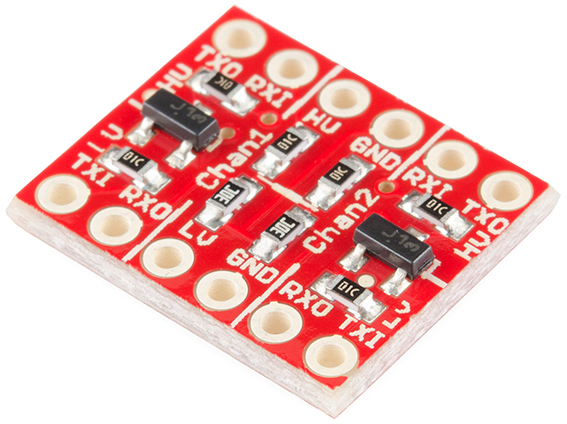
With a Bi-directional Logic Level Converter


Logic Level Converter:  https://www.sparkfun.com/products/11978


From Sparkfun's Tutorial:

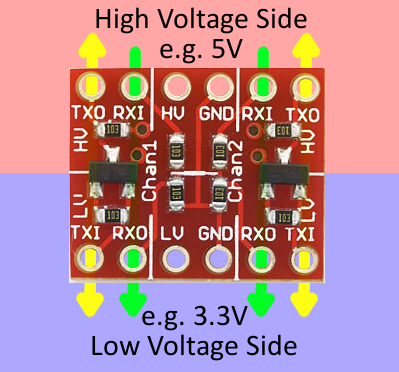
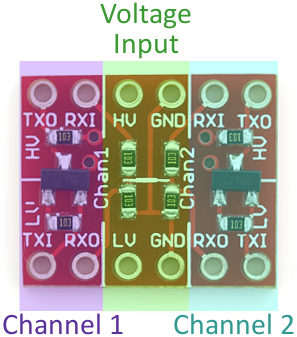
LLC input and output arrowsLLC divided into thirdsThe LLC is designed to be very easy to use. Silkscreen indicators help identify which pins do what. There are twelve pins total – six on each side. We can divide them into groups of three to more clearly define how they relate:
The middle section of the board is where the reference supply for your high and low voltages should go. Supplying voltage to all four of these pins is required. If you’re converting 3.3V to 5V (and vice-versa), for example, you’d run 5V into the “HV” side, and 3.3V into the “LV” input. Make sure each is grounded too!
The outer pins correspond to inputs and outputs for channels 1 and 2. Each channel has one voltage divider and one MOSFET shifter.
The labels on these pins – “RXI”, “RXO”, “TXI”, and “TXO” – help describe what each pins does:

  • RXI – High voltage input to voltage divider from high-voltage device. Signal will be shifted down and sent to low-voltage device on “RXO” pin.
  • RXO – Low voltage output from voltage divider to low-voltage device. Signal is shifted down from “RXI” input.
  • TXI – Low voltage input/output of MOSFET circuit. This pin interacts with “TXO” on the high side. Bi-directional, but this is the only shifter that will shift from low to high.
  • TXO – High voltage input/output of MOSFET circuit. This pin interacts with “TXI” on the low side. Bi-directional, but this is the only shifter that will shift from low to high.
To send a signal from the low-voltage side to the high-voltage side (e.g. from 3.3V to 5V), the signal must be input at “TXI”. It’ll pass through the converter and come out as a higher voltage on the “TXO” (transmit output) pin.
On the other hand, a signal that strictly travels from high to low-voltage should pass from “RXI” to “RXO”.
Sending a signal from the high side to the low side is less restricted. We can use either the bi-directional channel or the voltage divider, but we may need to leave the bi-directional channel for converting from low-to-high.


Example Wiring of 3.3v and 5v I2C devices together.

Here, we have an Arduino UNO, an Accellerometer, a Compass, a Barometric Pressure Sensor, and a Raspberry PI all on the same I2C channel.  The neat thing is that with the UNO, as it has a 3.3v regulator on board, you can power  both 3.3v and 5v devices.

Raspberry Pi and Arduino over I2C


References:
Arduino Forum : I2C Bus with 3.3v and 5.0v Device
Raspberry Pi and Arduino linked via I2C
Sparkfun: Using the Logic Level Converter
https://www.sparkfun.com/products/11978

UM10204: I2C-bus specification and user manual Rev5

Sparkfun,
Adafruit,
SeeedStudio,
Parallax,
Pololu,

Thursday, 14 November 2013

Out with the Serial, In with I2C - Multimaster - that is...

So I've whined a bit here about some of my hurdles communicating between the Raspberry Pi and the Arduino's, as well as managing critical timing issues on the Arduino.


I spent roughly $30 CDN on the Arduino branded Motor Shield V3 which uses the L293D darlington H bridge driver to provide control over 2 DC motors.

To provide this control, it consumes 8 pins of the Arduino.  6 Digital, and two Analog.

From http://www.instructables.com/id/Arduino-Motor-Shield-Tutorial/ :
There are pins on the Arduino that are always in use by the shield. By addressing these pins you can select a motor channel to initiate, specify the motor direction (polarity), set motor speed (PWM), stop and start the motor, and monitor the current absorption of each channel .
The pin breakdown is as follows:
FunctionChannel AChannel B
DirectionDigital 12Digital 13
Speed (PWM)Digital 3Digital 11
BrakeDigital 9Digital 8
Current SensingAnalog 0Analog 1


It also provides a few handy headers for sensors....  but..... it is not an intelligent device, rather requiring all control code to be written in the Arduino Sketch.


For the same $30 CDN, I just purchased AdaFruit's Motor Shield V2 which uses a pair of Mosfet TB6612 H-Bridges for higher current capabilities to drive four DC motors, or two Stepper motors, or one Stepper and two DC motors...  

These are controlled through the I2C interface.... so not taking up any other Arduino resources.
There are also pin headers that bring Arduino Pins 9 and 10 up for two 5v servos, but these are not I2C controlled...  Maybe on the next revision???  Please Adafruit?

I know, I know, I can add a Adafruit 16-Channel 12-bit PWM/Servo Driver - I2C interface  or stack a Adafruit 16-Channel 12-bit PWM/Servo Shield - I2C interface on top of this one....


Anyway, I expect to have good results out of this controller by the weekend, and fully expect that by using the Servo Timer1 library, I will  remove my timer0 issues regarding  delay() and millis().


References:


Tuesday, 12 November 2013

The 3 'R's' - Rethinking my Requirements for a Rover....


This blog entry is just me thinking out loud.. sort of... 

I've got a fair amount of sensory data coming into the rover.  It has three onboard processors, as well as the ability to communicate via wifi to a remote computer if more power is required...

I do not think that I have allocated the correct functions to each processor at the moment....


  • The Rover must be capable of autonomous travel within it's physical capabilities.
  • The Rover must be able to map it's surroundings, and attempt to localize against known landmarks
  • Failing Localization, the rover must create a detailed map of it's surrounding while wandering


This is all pretty much  SLAM mantra... not going to go more into this, at this time, but THIS functionality definitely belongs either on the Raspberry PI, or potentially on the remote CPU.


What makes THIS Rover special....


Sensory Inputs:

Proximity Sensors

  • Four Sharp IR 2Y infrared Distance sensors (20-150cm)  Front/Rear/Left/Right provide near-instantaneous information as to proximity of nearby objects.   Used to avoid collisions, as well as to avoid objects that are moving toward the Rover. (I'll discuss more about my desire to have fight-or-flight characteristics in a later blog.)   These are Analog output sensors, and require code to translate the logarithmic output to distance values.
  • Two MAXBOTIX  MaxSonar EZ1 Sonar Distance sensors (0-6.4m)  pan/tilt pod mounted are used for scanning the surrounds at intervals to create a proximity map of objects within range, and to feed this data to the SLAM algorithms.  These are digital PWM outputs and require simple code to convert pulse width directly to distance. 


Location and Motion Sensors

  • One ADAFruit Ultimate GPS sends serial strings to provide GPS positioning data.  This will become more valuable as the rover size and scope of travel increases... Currently - with a 5meter accuracy -- simply helps localize to a region of a map...

  • Two QRD1114 IR sensors are utilized as wheel encoders (one on each side) currently running in analog comparator mode... My though on single encoders per wheel instead of dual, is that I am using them on the drive wheels, and therefore control the direction of the wheel. I do not need to ascertain it.


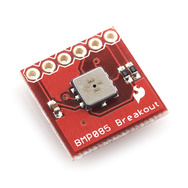
  • One Sparkfun ADXL345 triple axis accelerometer. Motion data will be used to compare and validate Wheel Encoder data for positional accuracy.  This is an I2C device. 

  • One Sparkfun HMC6352 compass module. Used to correct "pose" information in the mapping and location functions, also used for trajectory functions.  This is an I2C device. 


Other Environmental Sensors

  • One RHT-03 relative humidity and temperature sensor.  This is a one wire device.

  • One photoresistor  to determine ambient light. Used for adjusting sensitivity on webcam etc... yes..  I know there are algorithms to do this from the camera stream itself, but none of them can be done in a few lines of code and for ten cents...

  • Two condensor microphones, one each side of the rover to determine direction of incoming sounds, as well as simply recording ambient sound or ultimately taking verbal commands.


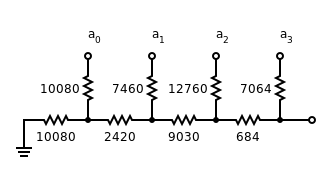
  • One resistor ladder to provide Battery Voltage information.  This is an analog input that needs to be evaluated against a voltage standard for calibration. 


  • One Standard USB Webcam.  This is used to record images during a "Look" command (look left, look right, look ahead), to record motion when required, or to take scheduled snapshots.


Controlled Outputs:


Motion:


  • Two 6volt DC gear motors.   The Rover uses differential drive.  Wheel encoders assist in maintaining speed and course correction. 

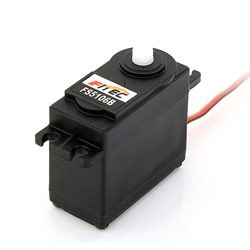
  • Two servo motors for pan and tilt function of Sonar/Webcam pod.

Signalling and Communication:


  • One bank of 9 Bright White LEDs  located on pod for illumination.


  • One bank of  6 High Intensity Infrared LEDs located on pod for dark illumination. (can also be modulated and used to control external IR devices)
  • Four Bright RED LEDs, situated on each corner as "turn signal" indicators. 
  • One Laser Diode located on pod for identifying remote objects. (ok... it's a simple laser pointer...)  This may potentially be used for parallax range finding.
  • One  one inch audio transducer for use as audio out to communicate, or as a "in motion"  beeper when required. 


Distributing the workload appropriately:

Over the course of the next week, I will be re-working the who-does-what for each processor as follows:

Raspberry Pi  
  • will provide central control and communications with Web Console and Database.
  • will provide for mapping and localization
  • will manage both audio input and output.
  • will become I2C master for ALL input and output devices. 
  • will record GPS data to database
  • will record compass data to database, and provide to Arduino UNO for course correction
  • will record accelerometer data to database
  • will record environmental data to database.
  • will manage clean shutdown on low power. 
  • (future state will return to charging dock)
  • will manage USB webcam 

Arduino UNO 
  • will be set up as an I2C slave.
  • will control the two DC motors via the MotorShield, and read the two QRD1114 encoders to keep the motor speeds / distance travelled accurate.  
  • will monitor and manage the four Sharp IR proximity sensors for localized range sensing.
  • will manage "fight-or-flight" reaction for obstacle avoidance even while at rest.
  • will monitor battery condition.

Arduino FIO
  • will manage pan and tilt servos for pod.
  • will manage MAXSonar EZ1 front and rear pod mounted range finders. 
  • will manage Bright White illumination 
  • will manage High Intensity IR illumination
  • will manage Laser pointer
  • will manage signaling LEDs


wish me luck....  


Sunday, 10 November 2013

The case for lurking on LMR before starting on a large (ish?) robotics venture...

Ok... so let me start with...

 I've been humbled by the sheer simplicity with which some of these bots on LMR (Lets Make Robots) are made.  Functional and clean.


The one article that has made me rethink my strategy the most is  Oddbot's article Pushing the limits with encoders

In my Robot here, I use a RaspBerry Pi to talk to two Arduino's via Serial over USB.  The premise being that the USB was already there for programming... might as well use it for communications. Then one of the Arduino's is also an I2C master to various sensors, that it then translates into serial feeds for the RPI.... hmmmmm....  can anyone say "inefficient"? 

I *had* investigated the option of using the RPI as a I2C master, and the two Arduino's, along with all of the I2C sensors would become slaves... looking back, I passed up on this quickly because I would have had to build or buy a level converter.... really?

I've spent probably close to $500-$600 on this thing so far... and yet a few bucks... or more likely an hour at the soldering iron made my decision for me.


I've struggled for WEEKS on timing issues related to getting commands accurately into the Arduino running the motors (using the Motorshield V3) which uses two PWM drivers, as well as the two servos .... The UNO fully consumes Timer 0/1/2 to take care of these, and so all code has to be devoid of "delay()" or "millis()"....  Sending a Serial command formated with specific start character, as well as a command UID to be used to validate completion of the command back to the RPI.

So.....

I'm going to step back for a week... regroup... reassess what functions are best suited to which processor, and clean it up.

Raspberry PI being I2C Master.   Arduino UNO retaining Motor control as well as Wheel encoder and IR proximity, but as an I2C slave as opposed to "Serial - hope-it-gets-interpreted-properly".
As I was simply replaying the I2C sensors via serial for the RPI to interpret, store, react, anyway.... This will be a workload removed from the UNO.
I will still dedicate the Arduino FIO to managing the Sonar POD servos and MAXSonar EZ1s, for now... but will communicate with the RPI as an I2C slave.

I may ultimately be able to eliminate one of the Arduino's .... but we'll save that for the next robot.

Any suggestions, tips, words of kindness... laughter...  bring it on...


References:

http://blog.oscaraConnect Raspberry Pi and Arduino with Serial USB Cable
Raspberry Pi and Arduino Connected Using I2C
Raspberry Pi and Arduino Connected Over Serial GPIO
Step by Step Guide on Making an I2C Slave Device with an Arduino
Arduino.cc: Arduino as I2C Slave ?
Instructables: I2C between Arduino's
http://digitalcave.ca/resources/avr/arduino-i2c.jsp
Raspberry Pi master controls Arduino UNO slaves via I2C
I2C communication between a RPI and a Arduino


Tuesday, 5 November 2013